Relive Your Best Motorcycle Rides - Organize & Remember
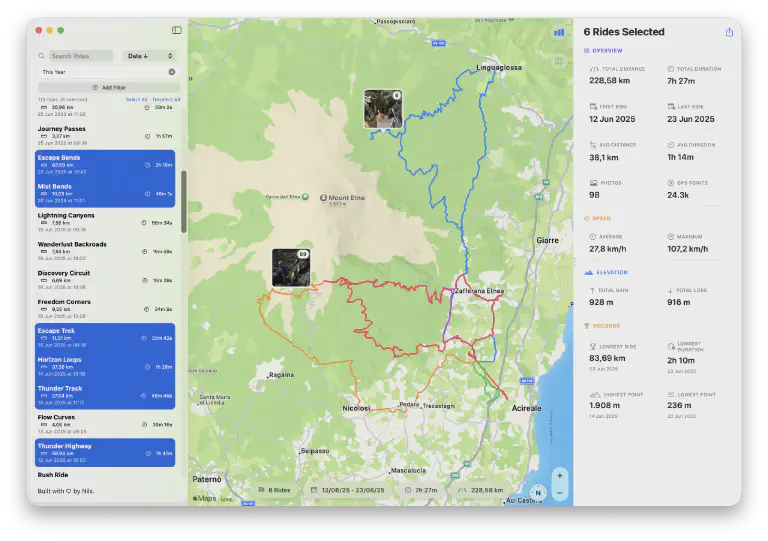 Relive your best motorcycle rides with photos matched to your routes
You’ve ridden amazing roads. Taken photos at mountain passes, coastal curves, and roadside stops you’d never have found otherwise. Recorded hundreds of GPX tracks across seasons of riding.
When did you last actually look back at them?
If you’re like most riders, those files sit in folders. The photos are somewhere in your Camera Roll, mixed with everything else. The memories exist - they’re just buried. Your rides deserve to be relived, not archived.
The Difference Between Archiving and Reliving
There’s a difference between storing data and accessing memories.
Archiving means files in folders. GPX tracks named ride_2024_07_15.gpx sitting in a directory you opened once. Photos scattered across years of Camera Roll. You know the rides happened, but finding anything specific means hunting through filenames and scrolling through thousands of images.
Reliving means browsing, remembering, feeling it again. Seeing the route on a map and remembering that corner. Finding the photo from the viewpoint and recalling exactly why you stopped there. Noticing how far you climbed and thinking about how the temperature dropped.
Most riders have archives, not memories. The data exists, but it’s not accessible in any meaningful way.
GPX files are just data. Coordinates and timestamps in XML format. They become memories when connected to context - the photos you took, the date it happened, the route on a map. Without that connection, they’re just files taking up disk space.
What Makes a Ride Worth Reliving
Think about what you’d want to see when looking back at a ride:
The route on a map. Not coordinates, but the actual path - the switchbacks, the coastal stretch, the detour you took because the main road was closed. Where you went matters.
The photos you took. Not scattered across your photo library, but placed exactly where you took them. That shot at the pass, pinned to the exact spot on the route. Context makes photos meaningful.
The date and circumstances. Was this your first long ride of the season? A trip with friends? That random Tuesday you took off work because the weather was perfect? When and why matter.
The stats. Distance covered, elevation gained, moving time. Numbers that remind you how far you pushed that day. Elevation profiles that show which sections were the real climbs.
When these pieces are connected, you’re not looking at files - you’re looking at rides. When they’re scattered across folders and apps, you’re just managing data.
Building Your Ride Memory Archive
Creating an actual archive that’s worth browsing requires two things: getting your ride data organized, and connecting it to your photos.
MotoFlow handles both.
Import GPX from anywhere. Whatever you use for navigation or tracking - DMD2, Calimoto, Scenic, Garmin, Apple Maps, or MotoFlow itself - export the GPX and import it. Bulk import handles entire seasons at once. Your complete ride history, organized by date, browsable visually.
Automatic photo matching. This is where archives become memories. MotoFlow reads the timestamps from your photos and matches them to your routes. That photo from the mountain pass appears exactly where you took it on the map. No tagging, no manual work - just photos pinned to routes.
Browse by season, location, or date range. Want to see all your rides from last summer? Filter by date. Looking for that route through the Alps? Scroll to find it. No more guessing which filename was which ride.
Elevation profiles for mountain routes. See exactly how much you climbed, where the steep sections were, and how the altitude changed. Stats that tell the story of the ride.
Start Building Your Archive
Import your GPX files and see photos matched to routes automatically.

Winter Evenings with Summer Rides
The bike’s in the garage. Roads are wet, cold, or covered in salt. Riding season feels far away.
This is when a proper ride archive earns its value.
Browse last season’s best routes. Find the ride you’d forgotten about - that perfect afternoon loop you took on a whim. See the photos from the pass and remember how the air felt different at altitude.
Share with riding buddies. Show them that route you’ve been talking about, complete with the photos that prove it was as good as you said. Plan next year’s version - longer, further, with more time for the sections that mattered.
Use your archive to plan next season. Which routes worked? Where did you want more time? What roads deserve a second visit? Your ride history becomes a planning tool.
Winter doesn’t have to mean forgetting about riding. It can mean revisiting the rides that made the season worth it.
Your Data, Your Memories
Where your ride data lives matters.
With MotoFlow, everything stays on your devices. GPX files import to your local storage and iCloud. Photos stay in Apple Photos - MotoFlow just references them. No data uploads to external servers, no accounts to create, no privacy policies to wonder about.
iCloud keeps everything in sync. Browse rides on your Mac at home, or pull up your archive on your iPhone to show someone a route. Same data, same photos, accessible wherever you are.
Export anytime. Your GPX files remain standard format, downloadable whenever you want. If you stop using MotoFlow, your rides and photos remain exactly where they were. No lock-in, no complicated migration.
Your memories shouldn’t depend on a company keeping its servers running or maintaining your account. They should just exist, on your devices, accessible as long as you want them.
Common Questions
How does MotoFlow match photos to my rides?
MotoFlow reads the timestamp and location data from your photos (EXIF data) and matches them to points along your GPX tracks. Photos appear exactly where you took them on the route - no manual tagging required.
Can I import rides from other apps like Calimoto or DMD2?
Yes. MotoFlow imports standard GPX files from any source - Calimoto, REVER, Scenic, DMD2, Garmin, or any app that exports GPX. Your entire ride history transfers over in seconds.
What if my photos are on my iPhone but my rides are on Mac?
MotoFlow uses iCloud to sync everything. Import GPX files on your Mac, and photos from your iPhone's Photo Library are automatically matched. Browse your complete ride archive on either device.
Do I need an internet connection to browse my rides?
No. Your rides and photos are stored locally and in your iCloud. Browse your entire archive offline - on a winter evening, on a flight, wherever.
What happens to my data if I stop using MotoFlow?
Your data stays exactly where it is - in your iCloud and Apple Photos. MotoFlow uses standard GPX format, so your rides remain exportable anytime. Nothing is locked in.
Your Rides Deserve Better Than a Folder
You put real effort into those rides. Early mornings, weather gambles, routes planned and improvised. The photos you took captured moments worth remembering.
Those moments shouldn’t sit in folders labeled with dates and coordinates. They should be browsable, connected, alive.
MotoFlow turns your GPX files and photos into an actual archive - something you’ll browse on winter evenings, share with friends, and use to plan the next season. Import once, remember forever.
Pay once. No subscription. Your data stays yours.
Get MotoFlow Today!
Track the ride. Relive the journey.